Retrofit Existing Robot Cells Into Bounded Autonomy
Keep the robot. Add the Xolver brain around it.
Industrial teams should not have to replace working robot cells to make them more adaptive. Xolver Retrofit brings review, AI assistance, and operating records around existing cells without turning the public site into an integration manual.
Sentinel can monitor cell state, exceptions, recovery paths, and evidence records so retrofit pilots remain easier to review.
Native OEM Compatibility
Xolver can discuss fit with existing robot cells and leading industrial equipment through qualified engagement. Public pages explain the buyer value; private materials cover the implementation details.
Industrial Robot Families













The Retrofit Studio Interface
Review equipment context, workspace assumptions, operator needs, and the records required for a retrofit engagement.
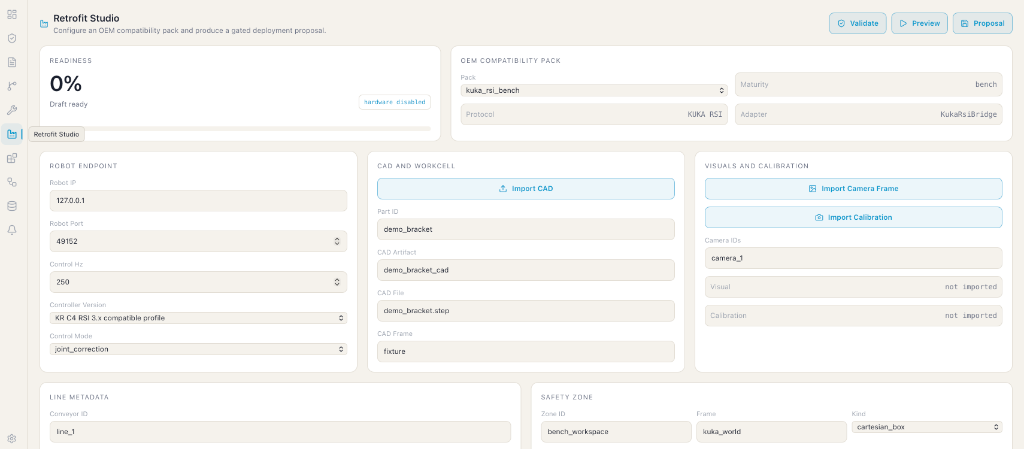
Xolver Retrofit Studio: commissioning setup for a reviewed robot cell.
Configured in Studio
Equipment Fit
Review whether the equipment, task, and operator needs fit the engagement.
CAD & Workcell import
Bring workspace context into the review so teams understand the physical cell.
Visuals & Safety zones
Keep observation context and operating boundaries visible to the team.
What It Enables
Bring reviewable AI assistance and operating records around an existing cell.
Equipment Fit Review
Review fit for supported robot families without exposing private engagement detail on the public site.
Workspace Context
Use part and workspace context to help teams understand the cell.
Observation Context
Keep cameras, fixtures, and other work-area context part of the review conversation.
Preview Review
Use previews to discuss proposed behavior before physical work changes.
Operating Boundaries
Keep proposed behavior tied to the limits and policies teams care about.
Complete Audit Trail
Every proposed action is logged with the reason it was approved, modified, or refused — giving teams a reviewable record of every decision.
Engagement Review
Before work advances, teams review equipment fit, operator needs, and operating context.
Motion Preflight
Every proposed task can be checked against the workcell before the robot moves, reducing surprises during commissioning.
Staged Engagement
New cell behaviors can be reviewed gradually without turning every update into an all-or-nothing decision.
Reusable Learning
Review records make it easier to understand which lessons may apply to related cells.
Contact-Rich Handling
Bring grip, touch, and handling context into the same review conversation.
Contact-Rich Manipulation
For tasks where force, touch, slip, or precise handling matter, Xolver helps teams inspect context and preserve a clear record of what happened.
End-Effector Review
End-effectors can be included in qualified engagement when they matter to the task.
Most factory automation breaks at the boundary between perception, control, and safety.
A robot may be able to move. A vision system may be able to see. A model may be able to infer task intent.
But production teams still need to know exactly what the machine is allowed to do, what it refused to do, and why.
Designed Around That Boundary
Xolver Retrofit coordinates adaptive-cell workflows through reviewed boundaries:
- Intelligence Proposes:The system can interpret work context and propose a next step for review.
- Boundaries Constrain:Reviewed safety, equipment, and site limits decide what can move forward.
- Implementation Stays Qualified:Controller-facing details are handled through private engagement materials.
Built As A Product Layer
Xolver Retrofit keeps the public story focused on application value, review, and operating records.
Core Integration Hooks
- Reviewed robot limits, workspace bounds, and safety rules
- Task-specific workflow review
- Engagement plans linking review, safety, and approval needs
- Continuous safety monitoring for policy violations
- Qualified paths for local hardware environments
- Manufacturer compatibility review for target equipment
- Studio-guided commissioning flows for setup and alignment
This keeps the public story focused on governance and review while partner-specific integration detail stays qualified.
Machine and workcell context
Safety and operating boundaries
Equipment fit review
Evidence and approval path
Specific setup methods, equipment details, and operating limits are not public website content.
Planning a retrofit engagement?
Start with a conversation about your existing robot cell, the work you want to improve, and the operating boundaries that matter.
Discuss integration with an engineer
hello@xolver.aiFAQ
Do we need to modify our robot controller's core firmware?
No. Xolver is designed to work around existing equipment and operating practices rather than replacing the controller.
How are safety constraints enforced on a retrofitted cell?
The retrofit path starts by understanding workspace boundaries, equipment behavior, operator review, and customer requirements.
What OEM compatibility packs are supported?
Compatibility work is handled through qualified evaluation. Public pages keep those details private.
Can a retrofit pilot start without replacing the existing cell?
Yes. Retrofit conversations start from the existing robot cell, task, fixtures, operator needs, and operating boundaries.
How should teams think about previews?
Previews are a review aid for understanding proposed behavior. They are not a public claim about facility readiness.
What happens when a retrofit check is incomplete?
The issue should be brought into review instead of being hidden or improvised around.
Can retrofit deployments include tactile or dexterous end-effectors?
Contact-rich handling can be part of a retrofit conversation when grip, touch, or handling context matters.